Checking for Required Patient Information
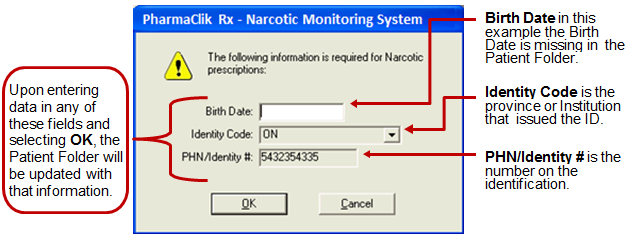
In order to send a patient’s prescription to the NMS, it is necessary to have the patient’s birth date and a number from government-issued identification. If any of these mandatory fields are missing from the Patient’s Folder, PharmaClik Rx will prompt you for that data upon filling the prescription. This will apply to all patients, regardless of who is paying for the prescription. In the prompt, the fields will missing information will be blank; the fields that already have information will display the current values and cannot be modified. Update the blank fields and select the OK button to continue.
You can set the Birth Date as a required field in PharmaClik Rx. When adding new patients to PharmaClik Rx you will be prompted to enter the birth date before saving.
To set Birth Date as a required field in PharmaClik Rx:
- Select More > Pharmacy to open Pharmacy Preferences.
- Select the Patient tab.
- Under the Required Fields section, select Birth Date.
- Select the Save button.