Drug and Mixture Folder
PharmaClik Rx provides the ability to transmit detailed information of the narcotic or controlled medication to the NMS. This transmission is triggered by an NMS flag in the Drug Folder, as well as the Mixture folder. The NMS flag is set based on the Monitored Drugs List (MDL).
The MDL is a list of products that the MOH has selected for monitoring. This list is used as a reference to determine if a submission to the NMS is required for the product being dispensed. McKesson maintains the MDL through your regular drug file updates. However, pharmacies are responsible for maintaining the NMS indicator on Mixtures and setting the appropriate pseudoDIN as determined by the MDL.
Monitored Drugs List: http://www.health.gov.on.ca/en/pro/programs/drugs/monitored_productlist.aspx
Drug Folder NMS Flag
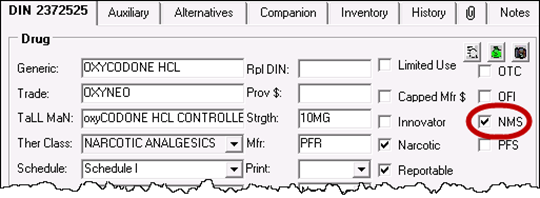
The NMS checkbox will be maintained by a Monitored Drugs List (MDL) provided by the government. Updates will be downloaded to all Ontario stores when changes to the list are issued. Users with access to Drug Folder Maintenance have the ability to add or remove the NMS flag.
To verify if a drug is flagged for NMS:
- Open the Drug Folder.
- Locate the NMS checkbox on the main tab. The NMS checkbox will be ON (checked), if the DIN is on the Monitored Drugs List.
Mixture Folder NMS Flag
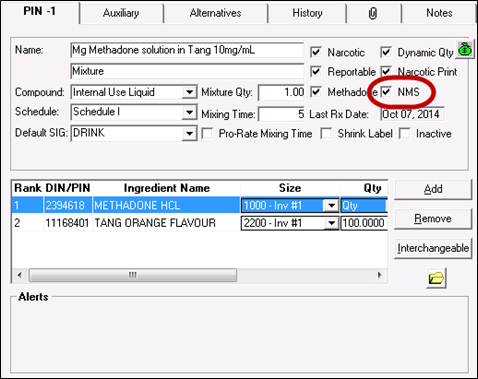
An NMS checkbox has been included in the Mixture folder, similar to the Drug Folder’s main tab. The NMS checkbox will indicate the inclusion of a mixture in the NMS program. This flag must be maintained by the store, along with the appropriate pseudoDIN for mixture.
To set the NMS flag for a mixture:
- Open the Mixture’s Folder.
- In the main tab, select the NMS checkbox.
- Select the Save or OK button.
Setting Alternative DINs for NMS Mixtures
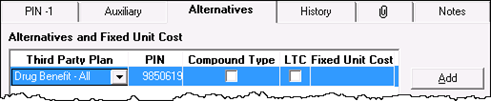
When a mixture has a PIN that falls under the MDL, then that PIN must be set in the Mixture’s Alternatives tab for adjudication (e.g. Methadone or an injectable mixture). Otherwise, if the mixture contains an ingredient that exists on the MDL, use the PIN 9857417 for a Generic Monitored Drug Compound. In all cases, the Third Party Plan must be Drug Benefit – All, as PharmaClik Rx will submit the ODB PIN to the NMS.
Viewing the History Tab
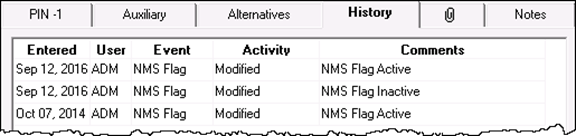
Changes to the NMS flag will be tracked in the History Tab of the Drug or Mixture Folder. The Comments column will indicate the state of the NMS flag:
- NMS Flag Inactive
- NMS Flag Active
In the Drug Folder, McKesson updates to the NMS flag will be recorded under the user ADM.
To access the History tab:
- Open the Drug or Mixture Folder.
- Select the History tab. Review the history of changes.