Setting Defaults for New and Refill Prescriptions
By setting user preferences for new and refill prescriptions, you can cut down on the amount of steps involved in processing prescriptions. Users can customize their own settings for new and refill defaults through pharmacy preference settings.
Note: Depending on security settings, you may not have access to update user preferences. Contact your system administrator if user preferences need to be updated.
To set the new and refill defaults:
- Navigate to More > Pharmacy.
- Select the User tab.
- Under the PharmaClik Rx section, select New Rx Default dropdown, and select one of the following:
- To Do Tab Button: Defaults the Move to Entry button in the New Prescription window. Use this setting if you are using workflow with different workstations for prescription intake and prescription data entry.
- Process Button: Defaults the Process Now button in the New Prescription window.
- From the Refills Default: Workbench dropdown, select the Process Button.
- From the Refills Default: Profile dropdown, select the Process Now Button.
- Select the Save button.
- Log off PharmaClik Rx and log back in to apply the changes.
Note: Workbench applies when a prescription is refilled from the Workbench.
Note: Profile applies when a prescription is refilled from the Patient Folder.
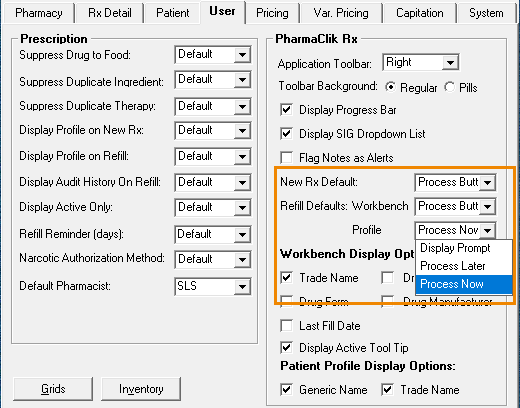
New Rx Default
From the New Prescription window, you can choose the default function button: Move to Entry or Process Now. The default function button will be activated when you press the Enter key on the keyboard.
Refill Defaults: Workbench and Profile
User preferences for refills allow you to determine how the refill will be processed from the Patient Folder or from the Workbench. For refilling from the Profile tab in the Patient Folder, you can choose one of three options:
- Display Prompt
- Process Later
- Process Now
When Display Prompt is selected, a message will ask if you want to process the prescription now. The message is not displayed when either Process Later or Process Now is selected; Process Later will place the prescription on the Workbench To Do tab, while Process Now will open the prescription in Rx Detail.
For refilling prescriptions from the Workbench, you can choose the default function button for the Refill Prescription window: OK or Process. The default function button will be activated when you press the Enter key on the keyboard.