Filling a Mixture
To fill for a mixture in PharmaClik Rx:
- Select the Patient button to search for and select a patient.
- Select the Profile tab.
- Select the New button. The New Prescription window opens.
- In the New Prescription window, specify the following fields:
- Drug(s)—type the drug name or DIN. Tip: Type “compound” to view all drugs and mixtures beginning with the word "compound".
- Doctor—Type the Doctor's name in this format: Last Name, First Name.
- Qty Auth—Type the total amount authorized by the prescriber including repeats.
- Qty—Type the number of tablets, capsules, or units that you will dispense for this prescriptions.
- SIG—Type the prescriber's instructions for use or dispensing directions.
- Days Supl—Type the number of days this prescription will last.
- UOM —For New Brunswick and Saskatchewan pharmacies, select the unit of measure for the mixture.
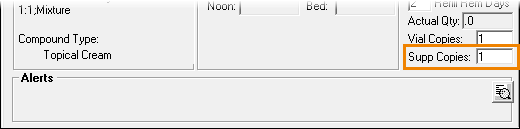
- Optional - In the Supp Copies, adjust the amount of supplementary labels that print. This is default to 1.
- Select the Process button. The Drug and Mixture Search window opens.
- Select the correct mixture for processing.
- Select OK. The Doctor Search window opens.
- Select the correct doctor.
- Select OK. The mixture opens in Rx Detail.
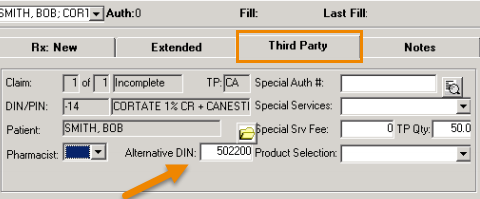
- Select the Third Party tab.
- Review the information in the Third Party tab.
- Ensure the Alternative DIN field is populated with an appropriate number. If not, contact your Third Party plan to retrieve the Alternative DIN and update the Alternative DIN Field.
- Select the Fill button.
Note: When a free-form drug or mixture is created in PharmaClik Rx, it will be assigned a negative PIN (e.g. -1). As a result, the Alerts section advises that the interaction checking will not be performed on this mixture).
Result: A third party response code or rejection message will display in the bottom of the screen. If a claim is rejected, you may be required to type an intervention code before you can continue to bill the prescription.